
A vacuum cleaner only works well when it is not full. If your Hoover has lost suction, smells musty or leaves dust behind, the first thing to check is the dust cup or bag. Knowing how to empty a Hoover vacuum correctly takes only a couple of minutes, keeps the machine running strongly and helps it last for years.
The exact steps depend on the type of Hoover you own: bagless upright, bagged upright, cordless stick, canister or handheld. This guide covers every common type, with simple steps, cleaning tips for filters, how often to empty, and the mistakes that harm suction.
Table of Contents
- Quick answer: how to empty a Hoover vacuum
- Find out which type of Hoover you have
- How to empty a bagless Hoover (dust cup)
- How to change the bag on a bagged Hoover
- How to empty a cordless or stick Hoover
- How to empty a Hoover canister vacuum
- How to empty a Hoover handheld vacuum
- Cleaning the filters after emptying
- How often should you empty a vacuum?
- Signs your vacuum needs emptying or maintenance
- Common mistakes to avoid
- Choosing a vacuum that is easy to empty
- Frequently asked questions
Quick Answer: How to Empty a Hoover Vacuum
- Turn off and unplug the vacuum, or remove the battery on cordless models.
- Take the dust cup out by pressing the release button or latch.
- Hold it over a trash can and open the bottom door or lid to release the dirt.
- Tap the cup gently so that any stuck dust falls out.
- Check and clean the filters, then put everything back firmly in place.
If your Hoover uses a bag instead of a cup, you do not empty it. You remove it and replace it with a new bag of the correct type.
Find Out Which Type of Hoover You Have

Hoover makes many different models, and the way you empty each one differs slightly. Look for a clear plastic container, which means the vacuum is bagless, or a cloth or paper bag behind a cover, which means it is bagged.
| Vacuum Type | What You Do | How to Recognize It |
|---|---|---|
| Bagless upright | Empty the dust cup | Clear canister on the front of the body |
| Bagged upright | Replace the bag | Cloth cover on the body, no clear cup |
| Cordless stick | Empty the small dust cup | Slim body with a removable battery |
| Canister | Empty the cup or change the bag | Separate body on wheels with a hose |
| Handheld | Empty the small dust bin | Compact, held in one hand |
| Robot vacuum | Empty the small bin on the unit | Round, automatic cleaning robot |
If you are not sure, check the model number on the label under the vacuum or on the back of the body, and look it up in your user manual. The manual is always the best guide for your exact model.
What You Need
- A trash can or a large trash bag
- A pair of gloves (optional, if you are sensitive to dust)
- A dust mask (optional, helpful if you have allergies)
- An old toothbrush or a soft brush for the filters
- A microfiber cloth
- Scissors to cut away tangled hair
It is best to empty the vacuum outdoors or directly into a bin to keep dust out of the air in your home.
How to Empty a Bagless Hoover Vacuum (Dust Cup)

Most Hoover bagless uprights use a see-through dust cup that you can remove with one hand. Follow these steps.
- Switch off and unplug. Never empty a vacuum while it is on or plugged in.
- Find the release button. It is usually on the top or side of the dust cup, near the handle.
- Remove the dust cup. Lift it up and away from the body. Hold the handle, if your model has one, and keep it level so dust does not spill.
- Carry it to the trash can. Hold the cup over or inside the bin to keep dust from spreading.
- Open the bottom or lid. Press the release latch to open the door. The dirt will fall out. Do not shake it near your face.
- Tap and scrape. Give the cup a few gentle taps on the inside of the bin. Use a brush or scissors to remove hair or fluff wrapped around the inner mesh or cyclone.
- Close the door tightly. You should hear a click. A loose door causes loss of suction.
- Replace the cup. Slide it back until it clicks into place.
Tip for Messy Dust Cups
If the dust is very fine and flies around, place a plastic bag over the dust cup first, hold the bag tight around it, then open the door inside the bag. This keeps almost all of the dust contained.
How to Change the Bag on a Bagged Hoover Vacuum

Bagged models do not have a dust cup to empty. Instead, you remove the full bag and fit a new one. Use only the bag type listed in your manual, because the wrong size can leak dust into the motor.
- Turn off and unplug.
- Open the bag cover. It is usually a latch or a door at the front or top of the body.
- Remove the full bag. Pull the cardboard collar gently out of the holder. Many bags have a flap that closes automatically to seal the dust inside.
- Dispose of it. Place the whole bag in the trash. Do not empty and reuse a paper bag.
- Insert a new bag. Slide the collar into the holder until it clicks.
- Close the cover. Make sure the latch is secure.
- Check the filters. Replace or clean them as the manual advises.
A bagged vacuum should be changed when the bag is about two-thirds full or when the full-bag indicator shows. A very full bag blocks airflow and reduces cleaning power.
How to Empty a Cordless or Stick Hoover
Cordless Hoover vacuums have smaller dust cups, so they need emptying more often. The steps are similar to an upright, but you will usually do it over the bin without moving far.
- Switch the vacuum off. Remove the battery if your model allows it.
- Press the dust cup release button and take the cup off.
- Hold the cup over the trash can and open the bottom flap.
- Tap out the debris and remove tangled hair from the brush and cup.
- Rinse only the parts the manual says are washable, and let them dry completely before putting them back.
- Reattach the cup until it clicks.
For small homes or quick cleanups, empty a cordless Hoover after every use or two. It will keep the suction strong and the battery will not need to work as hard.
How to Empty a Hoover Canister Vacuum
Canister Hoovers can be bagless or bagged. For a bagless canister, lift the lid or release the dust bin, empty it into the trash and clean the filter. For a bagged canister, open the top cover, pull out the full bag and insert a new one. Always unplug the vacuum first.
How to Empty a Hoover Handheld Vacuum
Handheld models have a small dust bin that fills fast. Press the release button, remove the bin, empty it into the trash and tap the filter. Because it is small, empty it after every use.
Cleaning the Filters After Emptying

Emptying the dust cup is only half the job. A clogged filter causes weak suction and bad smells, even when the cup is empty.
- Locate the filters. Most Hoover bagless models have a foam or felt filter near the dust cup and a final filter near the motor. Your manual shows exactly where.
- Tap off dry dust. Knock the filter against the inside of the trash can.
- Rinse if it is washable. Many filters can be washed in cool water, with no soap. Check the label on the filter or the manual first.
- Squeeze and air dry. Let it dry completely for at least 24 hours before putting it back. A wet filter causes mold and can damage the motor.
- Replace when worn. If a filter is torn, stained or will not come clean, replace it. Many filters need replacement every 6 to 12 months, but follow your model’s guidance.
Important: Never wash a filter that is marked as non-washable. Do not use hot water, detergent or a dryer on filters.
How Often Should You Empty a Vacuum?

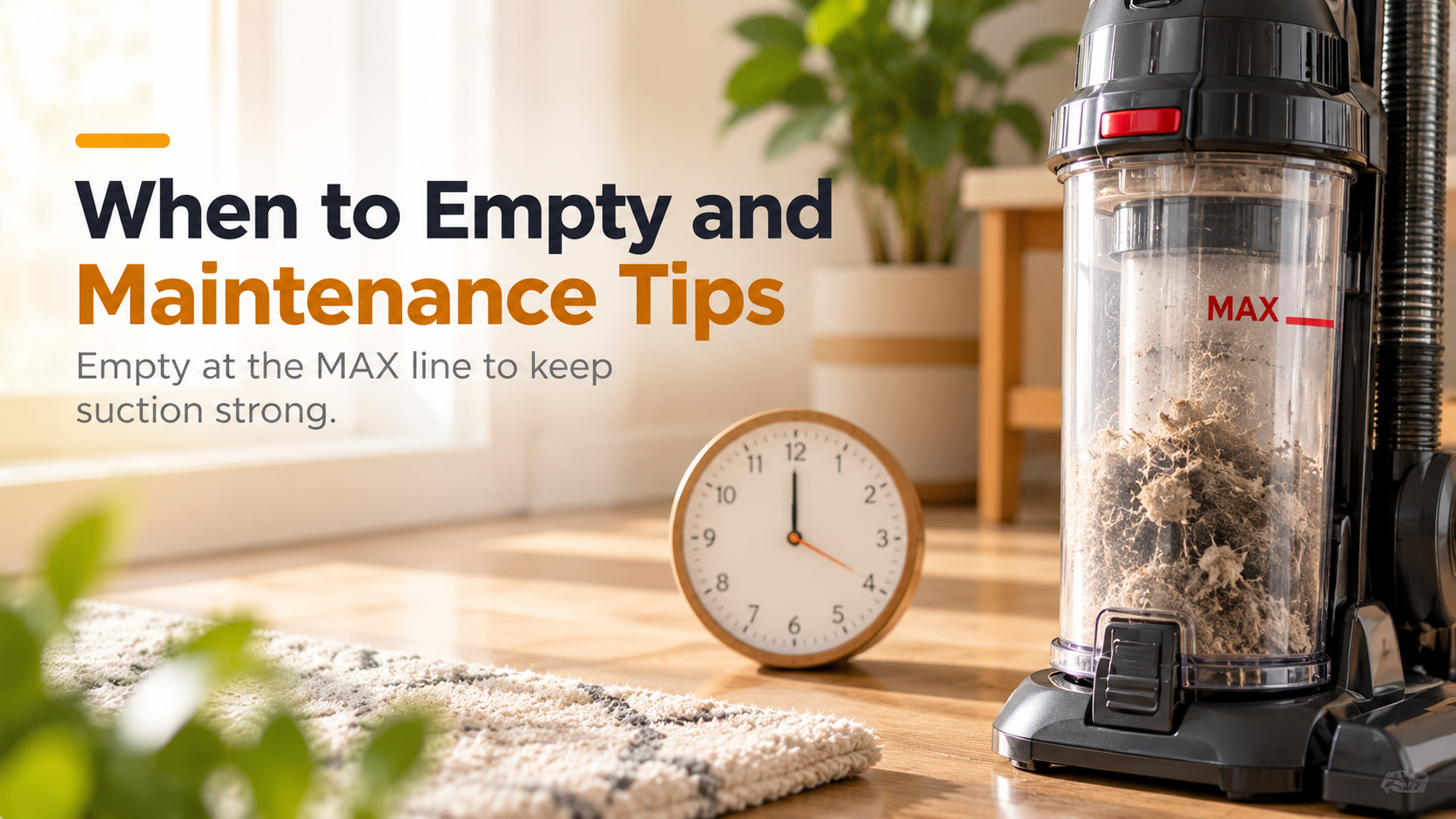
A good rule is to empty the dust cup every time you use it, or at least when it reaches the MAX line. Waiting until it is overflowing makes the vacuum work harder and reduces suction. Use this table as a guide.
| Task | How Often |
|---|---|
| Empty dust cup | After each use, or at the MAX line |
| Change vacuum bag | When about two-thirds full |
| Tap or rinse washable filters | Every 1 to 3 months |
| Replace filters | Every 6 to 12 months (check your manual) |
| Remove hair from brush roll | Every 2 to 4 weeks |
| Check hose and attachments for clogs | Every 3 months or when suction drops |
| Wipe the outside of the vacuum | Monthly |
If you have pets, allergies or thick carpets, increase the frequency.
Signs Your Vacuum Needs Emptying or Maintenance
- Suction feels weaker than before
- Dust or dirt is left on the carpet after vacuuming
- The dust cup is at or above the MAX line
- A musty or burning smell comes from the vacuum
- The motor sounds louder or higher pitched than normal
- The vacuum shuts off by itself because of overheating
- Hair is wrapped around the brush roll
If suction is still poor after emptying the cup and cleaning the filters, check the hose and attachments for blockages, and make sure the brush roll spins freely.
Common Mistakes to Avoid
- Emptying while plugged in: This is a safety risk. Always switch off first.
- Waiting until the cup is overflowing: It reduces suction and strains the motor.
- Putting back damp filters: Causes mold, smells and motor damage.
- Using the wrong bag: Dust leaks past the bag and into the motor.
- Using the vacuum without a filter: Fine dust gets inside the motor and shortens its life.
- Shaking the cup indoors: This spreads fine dust and allergens through the room.
- Vacuuming up wet messes or sharp objects: Unless your model is designed for wet pick-up.
- Forgetting to close the dust cup door: It leaks dirt back onto the floor.
Choosing a Vacuum That Is Easy to Empty
If emptying your current vacuum is messy or confusing, it might be time to upgrade. Here is what to look for in a new vacuum.
- One-touch bin release: A bottom-release dust cup lets you drop dirt into the bin without touching it.
- Large dust cup capacity: Fewer trips to the bin for large homes or homes with pets.
- Washable filters: Save money on replacements.
- Clear MAX line and a transparent cup: Makes it easy to see when to empty.
- Tangle-free brush roll: Less time cutting hair out of the brush.
- HEPA filtration: Traps fine dust and allergens, a good choice for allergy sufferers.
- Bagged models for allergy households: The sealed bag keeps dust contained when you throw it away.
Frequently Asked Questions
How do you empty a Hoover vacuum without making a mess?
Empty it directly into a trash can or an outdoor bin. For very fine dust, cover the dust cup with a plastic bag first, then open the release latch inside the bag.
Where is the dust cup release button on a Hoover?
On most bagless uprights, the button or latch is on the top or side of the dust cup near the handle. On stick models, it is normally on the top of the cup. Look at your manual for the exact location.
Can you wash a Hoover dust cup?
Many dust cups can be rinsed with cool water, but you should check your model’s manual first. Let the cup dry completely before putting it back.
How do I know when my Hoover vacuum bag is full?
Many models have a full-bag indicator. If yours does not, change the bag when it is about two-thirds full, or when you notice weaker suction or dust escaping.
Why does my Hoover lose suction even after emptying it?
The most common reasons are a clogged filter, a blocked hose or attachment, hair wrapped around the brush roll, or a dust cup door that is not sealed properly. Clean each of these in turn.
How often should I clean a Hoover filter?
Tap or rinse washable filters every 1 to 3 months, depending on how often you vacuum. Replace them about every 6 to 12 months or sooner if they are damaged.
Is it OK to vacuum with a full dust cup?
It is not harmful in a single use, but it lowers cleaning power and puts extra strain on the motor. For best results, empty the cup when it reaches the MAX line.
Can I use any bag in my Hoover vacuum?
No. Different models need different bag types. Using the wrong one can cause leaks and reduce suction. Check the bag type in your manual or on a label inside the bag cover.
How do I empty a Hoover robot vacuum?
Remove the small dust bin from the robot, open it over the trash, tap out the dust and brush off the filter. Empty it after every cleaning cycle if you have pets or heavy foot traffic.
Final Thoughts
Emptying a Hoover vacuum is simple once you know your model: turn it off, remove the dust cup or bag, empty it over a bin, clean the filters and put everything back securely. The best habit is to empty it after every use, or whenever the dust reaches the MAX line.
A few minutes of care each time protects the motor, keeps suction strong and makes your home cleaner. And if your current vacuum is hard to empty, a model with a one-touch bin release and washable filters can make the job much easier.